N/A
Home » Guides » r2c API’s

r2c API’s

Introduction

This guide explains how to use our APIs to perform testing prior to third-party integration and  development. It is designed to help developers understand the available endpoints, authentication requirements, request/response structures, and expected behaviours before building a customer-facing interface.

User Configuration – In order to use the API users must be set up with the correct configurations beforehand. These will be arranged by r2c and then shared with the relevant team. Please see below, the requirements needed for each API. 

Asset by Depot API

Credentials Required

The credentials required for this API are Account GUID and API Key.

Step by Step

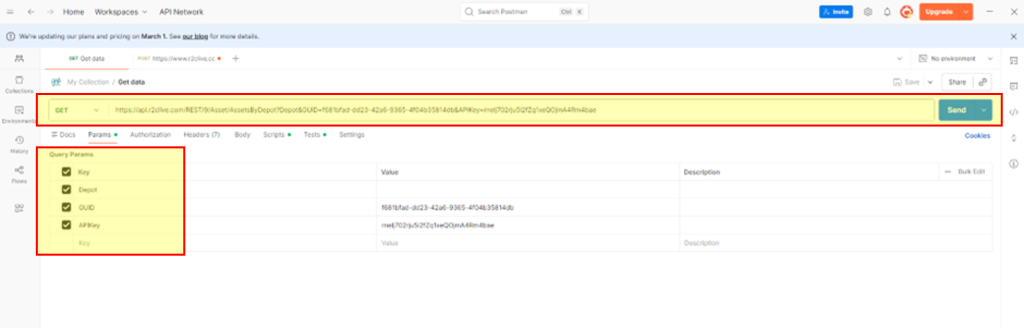
These steps show an example of using the Asset by Depots API to retrieve key details per asset across the fleet list. 

The parameteres required are:

  • Endpoint URL – https://api.r2clive.com/REST/9/Asset/AssetsByDepot
  • Depot (if filtering by specific sites)
  • Account Guid
  • API Key

Start by adding the URL and parameters to your third party app. Click ‘send’ to run the API. This example uses Postman. Below are a set of example reuslts retrieved by the API.

{
    “Response”: [
        {
            “Depot”: “R2C Test CTD1”,
            “RegistrationNumber”: “CC03WS”,
            “Payload”: 38000,
            “VinOrChassis”: “123456789ABC987”,
            “Status”: “Out of Service”,
            “Reason”: “Asset not in use”,
            “FuelType”: “CNG”,
            “EuroEmissionStandard”: “Microlise”,
            “Make”: “Mercedes”,
            “Model”: “310”,
            “AssetUsage”: “Spare Van”
        },
        {
            “Depot”: “R2C Test CTD2”,
            “RegistrationNumber”: “BU51DE”,
            “Payload”: 0,
            “VinOrChassis”: “1HGBH41JXMN109186”,
            “Status”: “Out of Service”,
            “Reason”: “Inspection / MOT / Service”,
            “FuelType”: “Diesel”,
            “EuroEmissionStandard”: “”,
            “Make”: “Alexander Dennis”,
            “Model”: “200EV”,
            “AssetUsage”: “”
        },

Create Asset API

These guides describe the API’s on the R2C Platform, accessible through the Public API’s as a REST API. These API’s do not have Swagger documents, the body information is included below. 

This API allows you to CREATE Assets within r2c using key/value pairs, utilising the POST method.

Parameters

The credentials required for this API are Account GUID and API Key.

Endpoints

Live – https://api.r2clive.com/rest/9/asset/CreateAsset

UAT- https://uat.r2clive.com/PublicApi/REST/9/Asset/CreateAsset

The main data sent via the API is through the body section. This consists of a R2CPublicAsset structure using the below fields 

Name Description
ExternalReference This value is displayed in Portal but cannot be added or edited and is defined by the organisation Actor Role Id.
RegistrationNumber The normal identifier for an Asset. Max 10 Characters.
VinOrChassis The Vin or Chassis number of the asset.
AssetType Example: Tractor, Trailer, Rigid etc.
Manufacturer Example: Scania, DAF, Volvo etc.
FleetNumber Fleet identifier, unique only to the customer’s account. Max 20 Characters.
Range Example: P series, CF, FM etc.
Model Example: P112, 530, 42T
ModelNumber Free Text, Max 20 Characters.
Description Free Text, Max 20 Characters.
RegDate Optional Date, YYYY-MM-DD
ManufactureDate Optional Date, YYYY-MM-DD
InServiceDate Optional Date, YYYY-MM-DD
MOTExpiryDate Optional Date, YYYY-MM-DD
TachoExpiryDate Optional Date, YYYY-MM-DD
WarrantyExpiryDate Optional Date YYYY-MM-DD
Workshop Primary Repairer
WorkshopID Site ID
TotalAssetCost String numeric value
UsageUnit Example: M, Km, H.
BodyType Example: Artic, Box, Bin Lift etc.
Usage Last Known Usage
ParentRegistrationNumber Optional reg of parent asset.
ParentExternalReference Optional external reference of parent asset.
GrossVehicleWeight Decimal gross weight in tonnes
Transmission Example: Automatic, Manual, Semi-Automatic.
Colour Example: Black, Brown Red etc.
EmissionStandard Example: Euro 6, FRD6 etc.
CustomDetails Custom field name and value. See “Custom Details and Custom Updates” for more information.

The API allow a collection of Management Roles to be assigned to the asset.

Note that the role name or code may be used in the “Role” parameter.

NameCode
ManufacturerMNFER
OwnerOWNER
OperatorOPROR
DepotDEPOT
Repair AgentRPRAG
WorkshopWRKSH
Warranty ProviderWPROV
Repair and MaintenanceREMNT
Custom Details

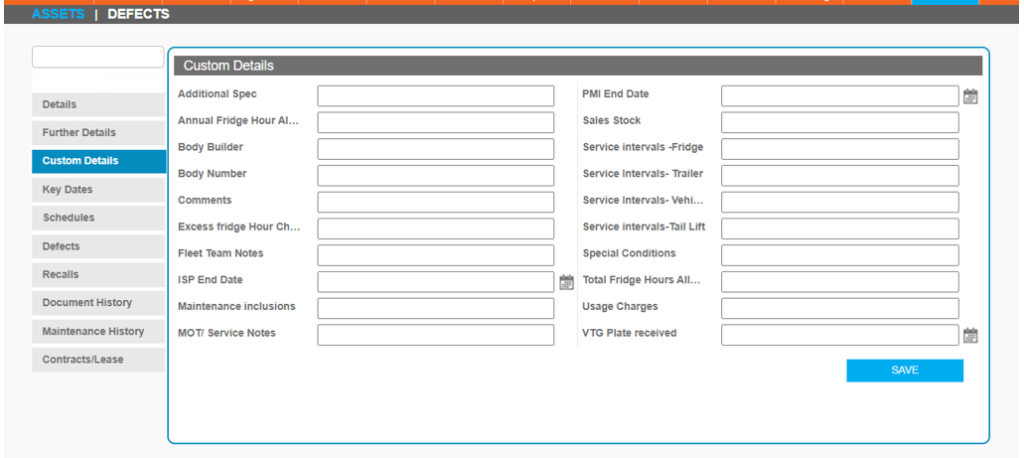
In the R2C platform, customers with the module enabled can create custom values for their assets. These values are only available to that specific customer and appear in a separate tab on the Assets screen.

There is an optional property “CustomDetails” which can be used to set a collection of key/value pairs that can be sent to the API. The key needs to relate to the name of the custom value, as it appears in the Portal screen above and the value needs to be valid for that Custom Detail, e.g. a number or a date.

{ “ExternalReference”: “CTOP23456”,
    “RegistrationNumber”: “CTOP-1”,
    “AssetType”: “Tractor”,
    “Manufacturer”: “John Deere”,
    “Range”: “Other”,
    “Model”: “Other”,
    “FleetNumber”: “APIAssets”
   }
{
    “Success”: true,
    “SuccessMessages”: [
        “Existing Asset will be updated”,
        “RegistrationNumber added for asset: CTOP-1”,
        “ParentRegistrationNumber was not populated. Data not added to asset.”,
        “ParentExternalReference was not populated. Data not added to asset.”,
        “FleetNumber added for asset: APIAssets”,
        “ChassisNumber was not populated. Data not added to asset.”,
        “ExternalReference added for asset: CTOP23456”,
        “BodyTypeDescription was not populated. Data not added to asset.”,
        “Manufacturer added for asset: John Deere”,
        “Range added for asset: Other”,
        “Model added for asset: Other”,
        “Owner was not populated. Data not added to asset.”,
        “OperatorID was not populated. Data not added to asset.”,
        “Operator was not populated. Data not added to asset.”,
        “OperatorDepotID was not populated. Data not added to asset.”,
        “OperatorDepot was not populated. Data not added to asset.”,
        “WorkshopID was not populated. Data not added to asset.”,
        “Workshop was not populated. Data not added to asset.”,
        “RMProvider was not populated. Data not added to asset.”,
        “UsageUnit was not populated. Data not added to asset.”,
        “Success creating asset ID : 1125168”
    ],
    “ErrorMessages”: [],
    “TimeOfResponse”: “2026-04-21T11:35:29.7557736+01:00”,
    “Result”: null
}

Update Asset API

These guides describe the API’s on the R2C Platform, accessible through the Public API’s as a REST API. These API’s do not have Swagger documents however the body information is included below. 

This API allows you to UPDATE Assets within r2c by matching key/value pairs, utilising the POST method.

Parameters

The credentials required for this API are Account GUID and API Key.

Endpoints

Live – https://api.r2clive.com/rest/9/asset/UpdateAsset

UAT – https://uat.r2clive.com/PublicApi/REST/9/Asset/UpdateAsset

The main data sent via the API is through the body section. This consists of a R2CPublicAsset structure using the below fields 

Match

This is a collection of key/value pairs that are used to match the existing Asset that you want to update.

NameDescription
ExternalReferenceThe external reference given by the customer when they created the Asset in the API.
VinOrChassisThe Vin or Chassis number of the asset.
RegistrationNumber The Registration Number of the asset.
Updates

A collection of key/value pairs, each specifying a property name and the required value to be updated on the asset record fields in portal.

NameDescription
ExternalReferenceA unique reference number for the account using the API.
VinOrChassisThe Vin or Chassis number of the asset.
FleetNumberThe customer’s fleet number for the asset. Max 20 Characters.
RegistrationNumberThe normal identifier for an Asset. Max 10 Characters.
Description? Free Text, Max 20 Characters.
RegDateOptional Date, YYYY-MM-DD
InServiceDateOptional Date, YYYY-MM-DD
ManufactureDateOptional Date, YYYY-MM-DD
ManufacturerExample: Scania, DAF, Volvo etc.
WarrantyExpiryDateOptional Date, YYYY-MM-DD
AssetTypeExample: Tractor, Trailer, Rigid etc.
BodyTypeExample: Artic, Box, Bin Lift etc.
InspectionInterval-
UsageUnitExample: M, Km, H.
WorkshopPrimary Repairer
WorkshopID? SITE ID
TotalAssetCost? String numeric value
UsageLast Known Usage
MOTExpiryDateOptional Date, YYYY-MM-DD
TachoExpiryDateOptional Date, YYYY-MM-DD
ParentRegistrationNumberOptional reg of parent asset.
ParentExternalReferenceOptional external reference of parent asset
GrossVehicleWeightDecimal gross weight in tonnes
TransmissionExample: Automatic, Manual, Semi-Automatic.
ColourExample: Black, Brown Red etc.
EmissionStandardExample: Euro 6, FRD6 etc.
ContractLeaseCompanyFree Text
ContractLeaseNumberFree Text
ContractLeaseTypeExample: 3 Year Rental, 5 Year Finance, Hired etc.
ContractStartDateOptional Date YYYY-MM-DD
ContractEndDateOptional Date YYYY-MM-DD
ContractMileageOptional max mileage
ContractExcessMileageChargeOptional excess mileage
ManufacturerRangeModelThe preferred method of setting the manufacturer, range and model. The three are separated by “|” like this: "Manu|Range|Model"
Model NumberFree Text, Max 20 Characters.
AxleConfigAxel configuration as Position, Steer & WheelCount.
Management RoleManagement details as Role & reference.* See available roles below
Custom DetailsCustom field name and value. *See Custom Details for more information.
Management Roles

The API allow a collection of Management Roles to be assigned to the asset.

Note that the role name or code may be used in the “Role” parameter.

NameCode
ManufacturerMNFER
OwnerOWNER
OperatorOPROR
DepotDEPOT
Repair AgentRPRAG
WorkshopWRKSH
Warranty ProviderWPROV
Repair and MaintenanceREMNT
Custom Details

In the R2C platform, customers with the module enabled can create custom values for their assets. These values are only available to that specific customer and appear in a separate tab on the Assets screen.

There is an optional property “CustomUpdates” which can be used to set a collection of key/value pairs that can be sent to the API. The key needs to relate to the name of the custom value, as it appears in the Portal screen above and the value needs to be valid for that Custom Detail, e.g. a number or a date.

{
    “match”:
    [{“key”: “ExternalReference”,
        “value”: “CTOP23456”}],
 
    “updates”:
    [{“key”:”BodyType”,
        “value”: “FEL”}],
 
    “customUpdates”:
    [{“Key”:”Axle 1 Tyre Size”,
        “value”:”Hello”}],
 
    “managementRoles”:
    [{“Role”: “WRKSH”,
        “Reference”: “wksp123”}]
}
{
    “Success”: true,
    “SuccessMessages”: [
        “BodyType updated successfully.”,
        “Asset updated successfully.”,
        “Custom details field ‘Axle 1 Tyre Size’ updated.”,
        “Asset custom details updated successfully.”,
        “Maintenance Products updated successfully.”,
        “The management role ‘WRKSH’ will be updated to ‘wksp123’.”,
        “Update of management roles succeeded.”
    ],
    “ErrorMessages”: [],
    “TimeOfResponse”: “2026-04-21T11:11:58.441072+01:00”,
    “Result”: null
}
Jobsheet API

Credentials Required

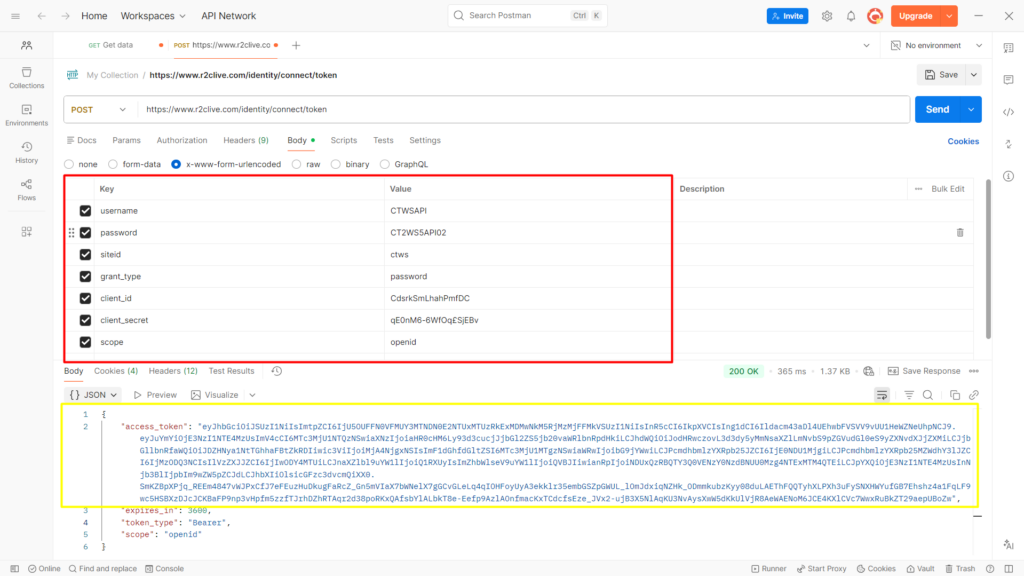
The credentials required for this API are outlined in the table below. Some of the required details can be found in your r2c portal account, while others are initially configured by r2c and shared with you during the setup process.

Step by step

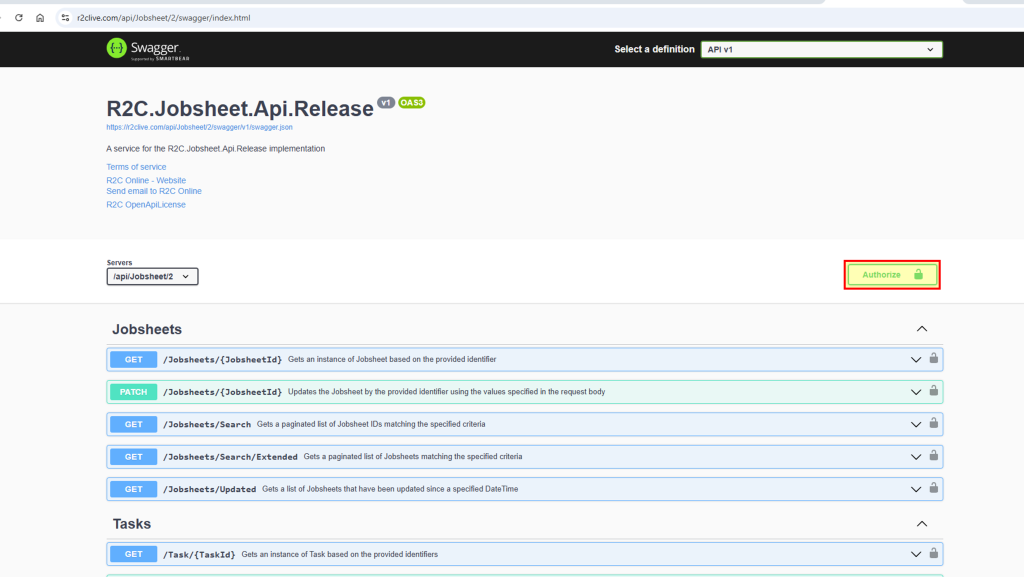
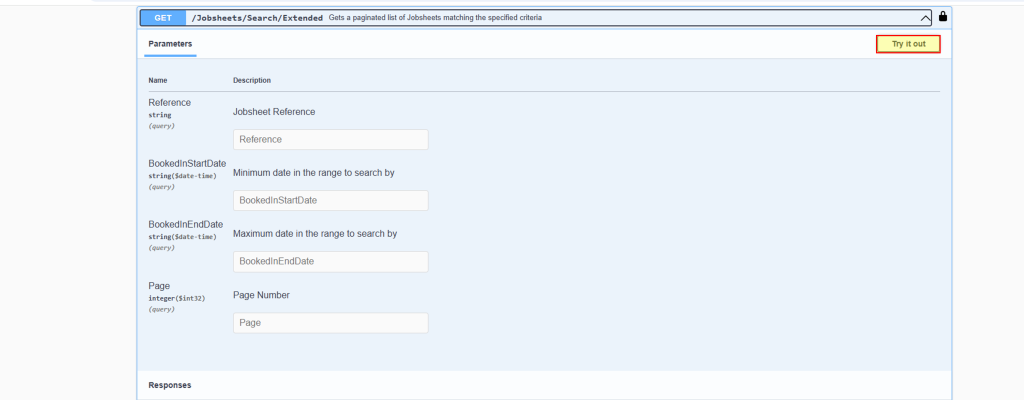
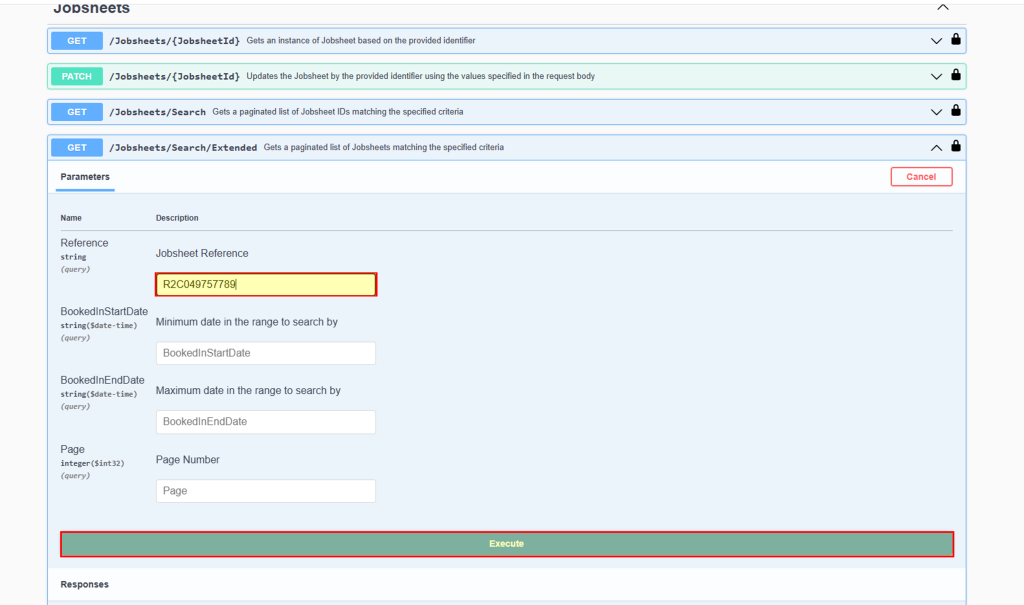
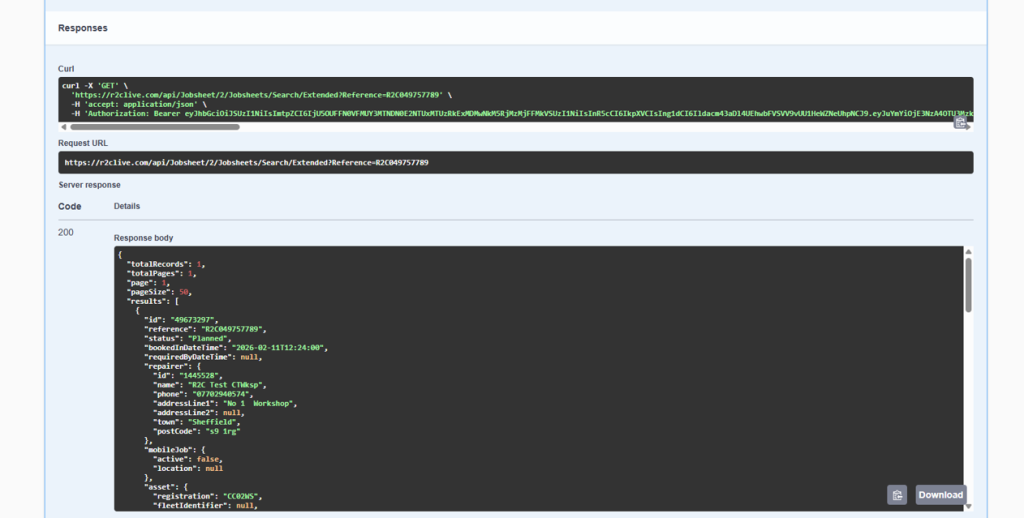
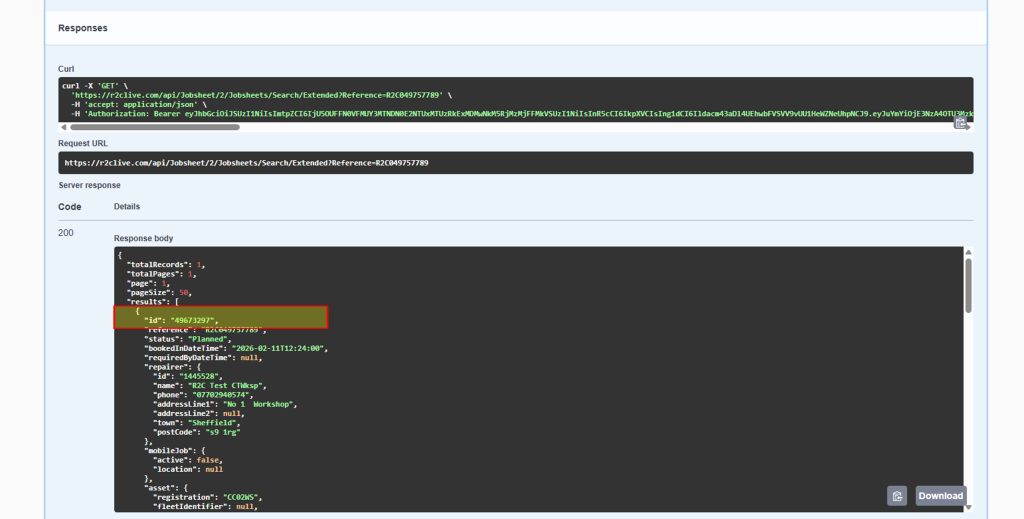
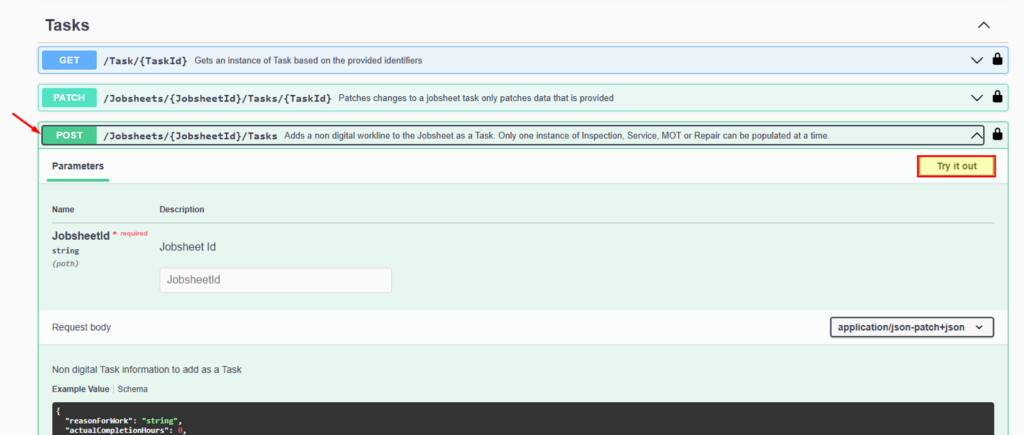
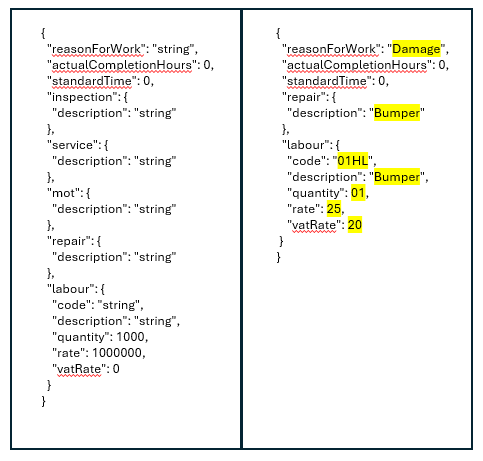
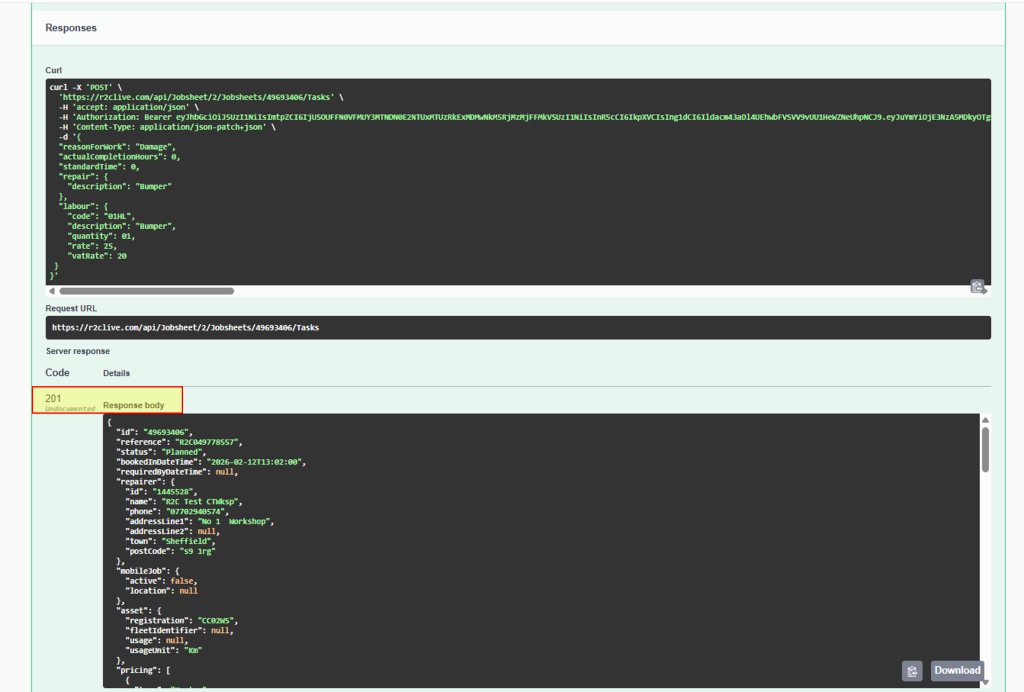
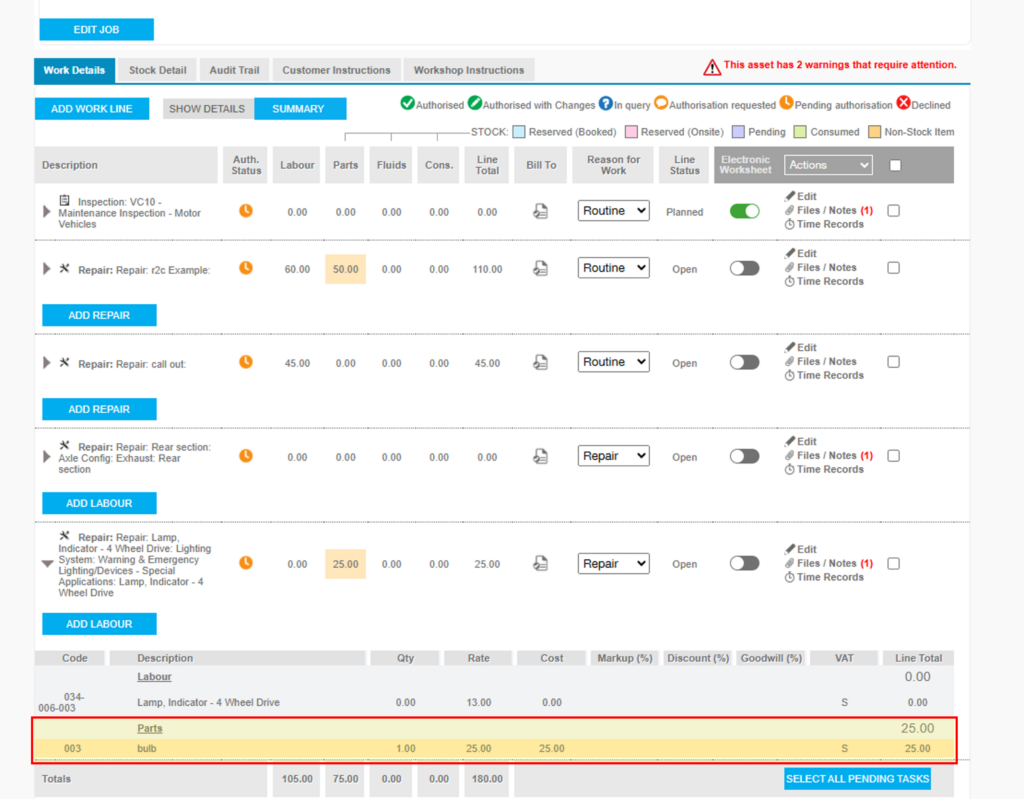
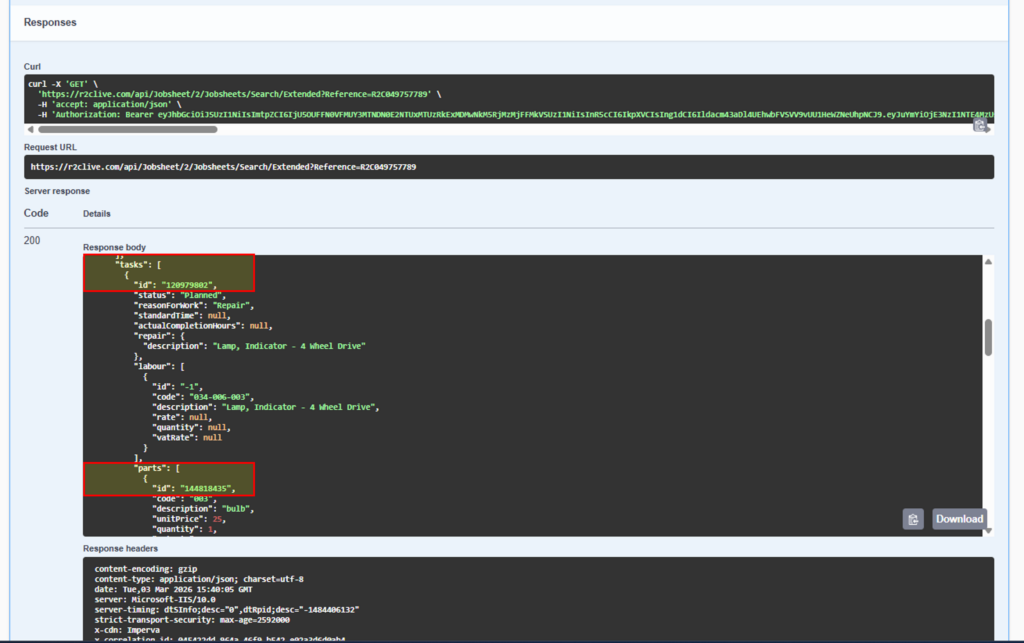
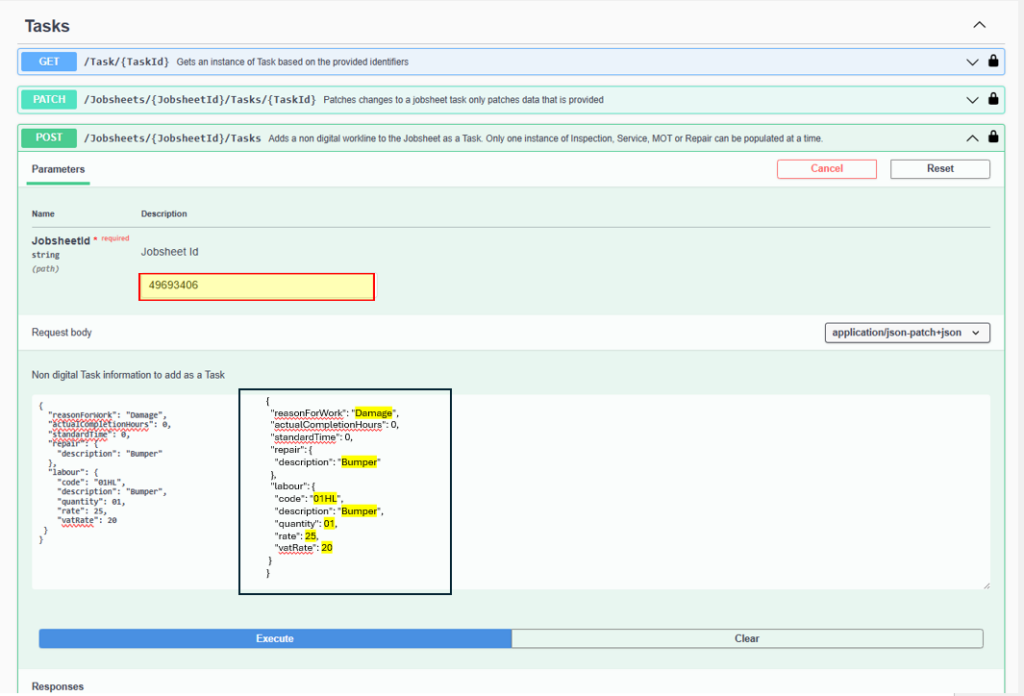
These steps show an example of using the Jobsheet API to retrieve key jobsheet details and update worklines.

The steps required are:

  • Credentials
  • Token Generation
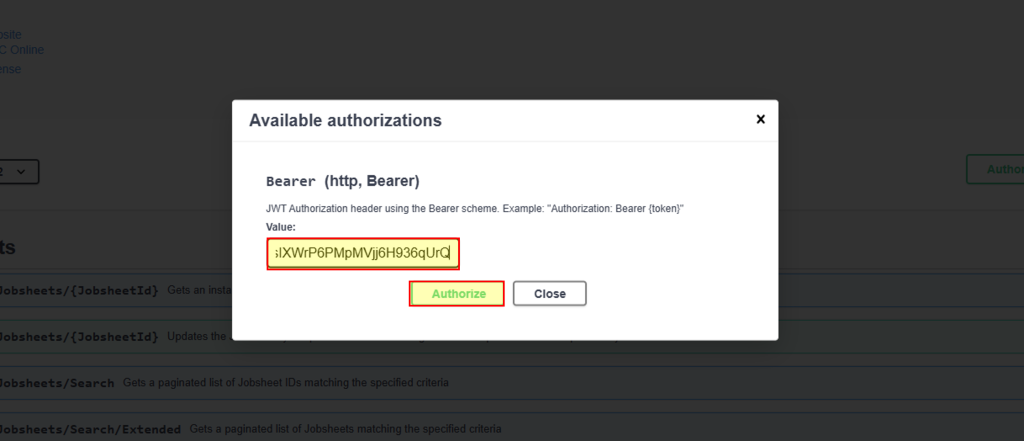
  • Authorisation of Token on Swagger docs prior to using an API. 
ParameterNotes
Swagger site URL https://r2clive.com/api/Jobsheet/2/swagger/index.html Default URL, to access the API
End point URL https://www.r2clive.com/identity/connect/token Default URL, replace 'www'. With UAT. Depending on Environment.
AccountAccount name as per portal-
Site IDAccount site ID that is used to login to portal.-
UsernameLogin credentials for portalProvided by r2c upon account configuration
PasswordLogin credentials for portalProvided by r2c upon account configuration
grant_type'password'This parameter remains the same for all accounts
client_idProvided by r2c upon account configuration-
client_secretProvided by r2c upon account configuration-
ScopeAccount type identifier. If your account type is a workshop use = openid and if an R&M = r2c_organisation_apiThis paramamter changes based on account type.

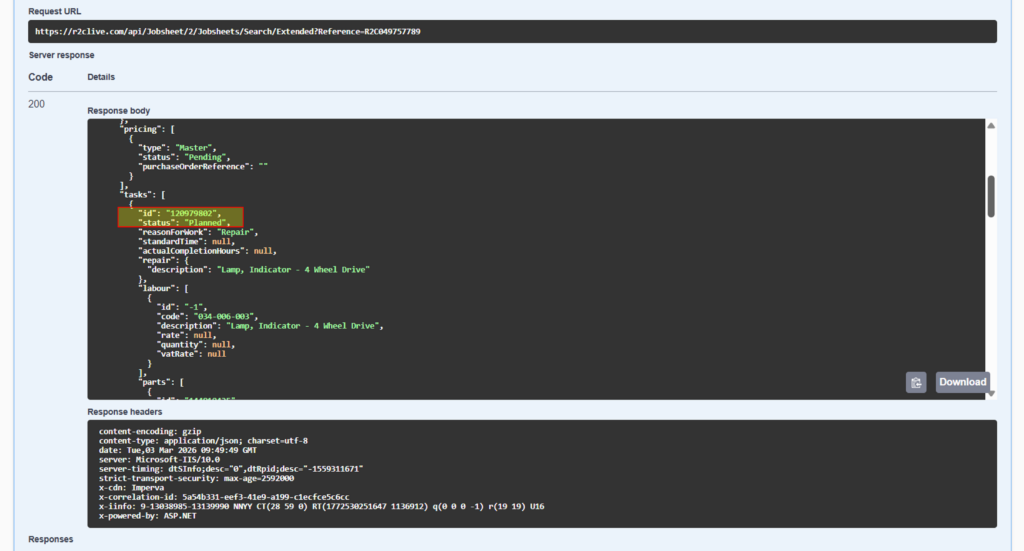
Jobsheet extended API – to retrieve jobsheet details.

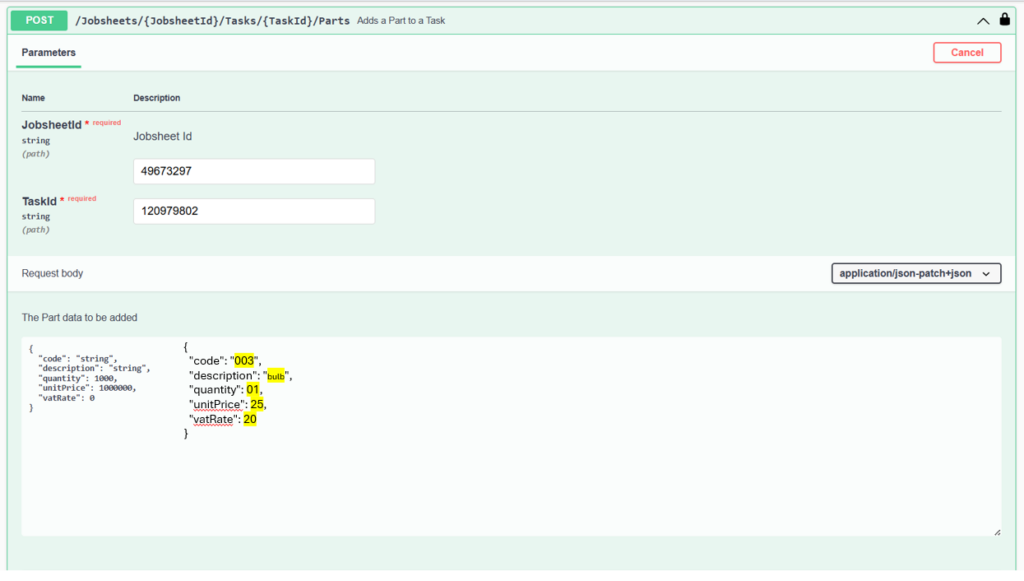
Jobsheet Post Tasks – to add worklines to jobsheets.

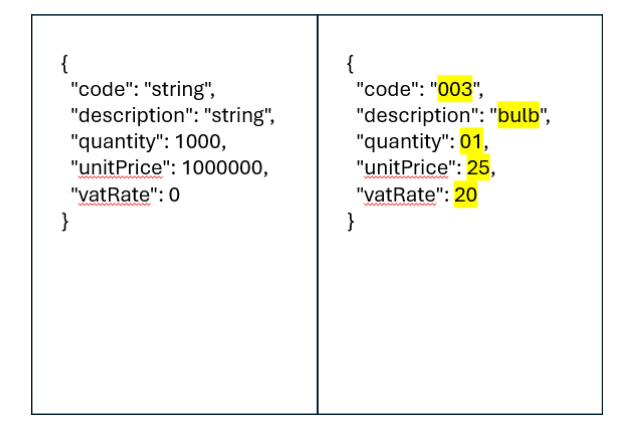
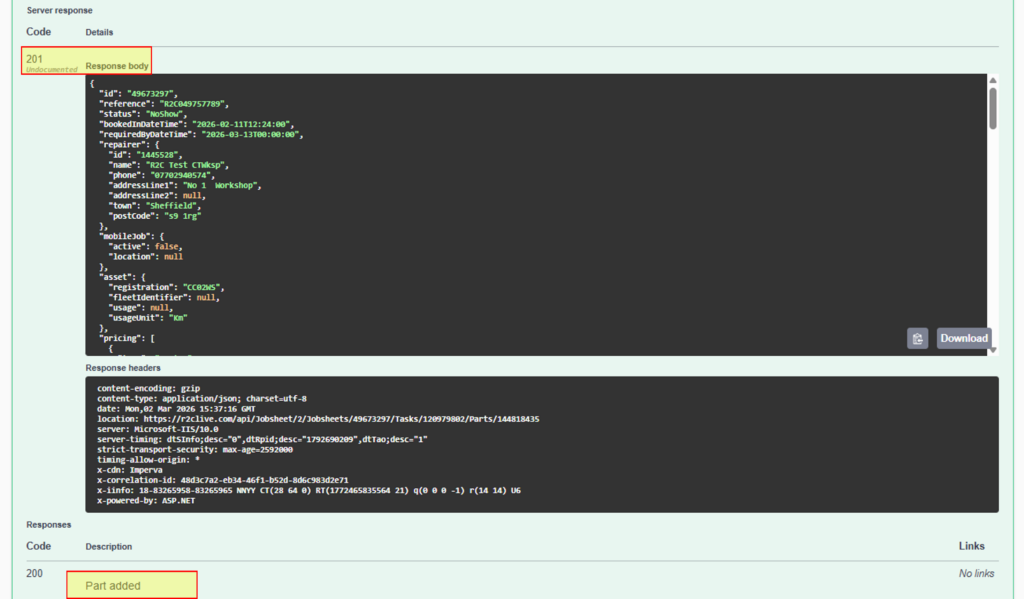
Jobsheet Post Parts- to add parts to existing worklines on jobsheets.

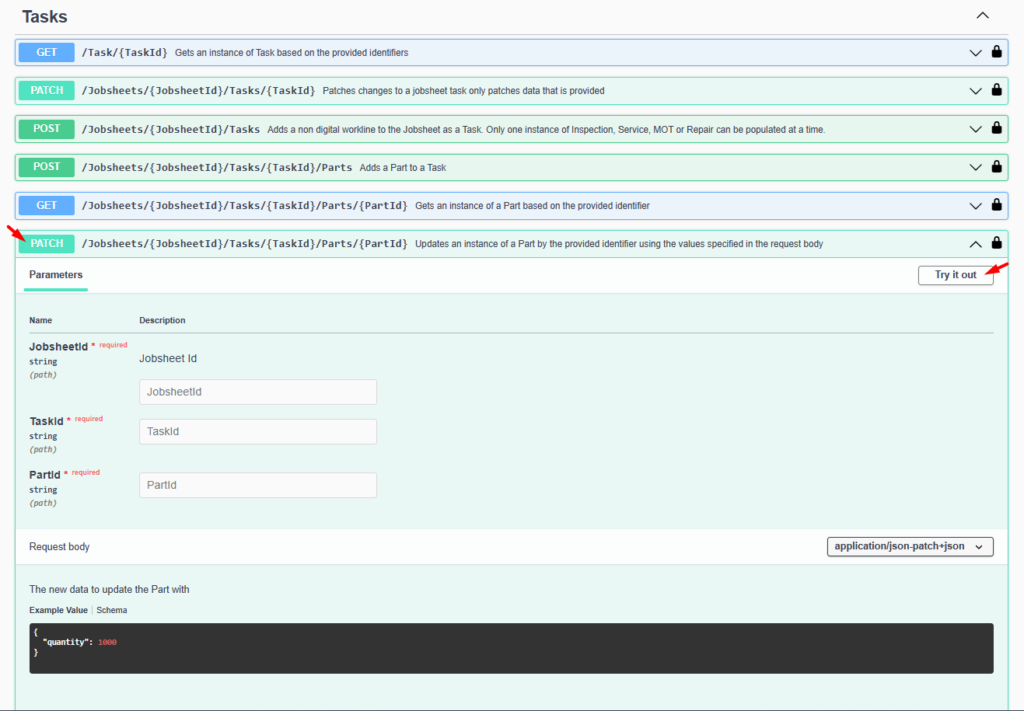
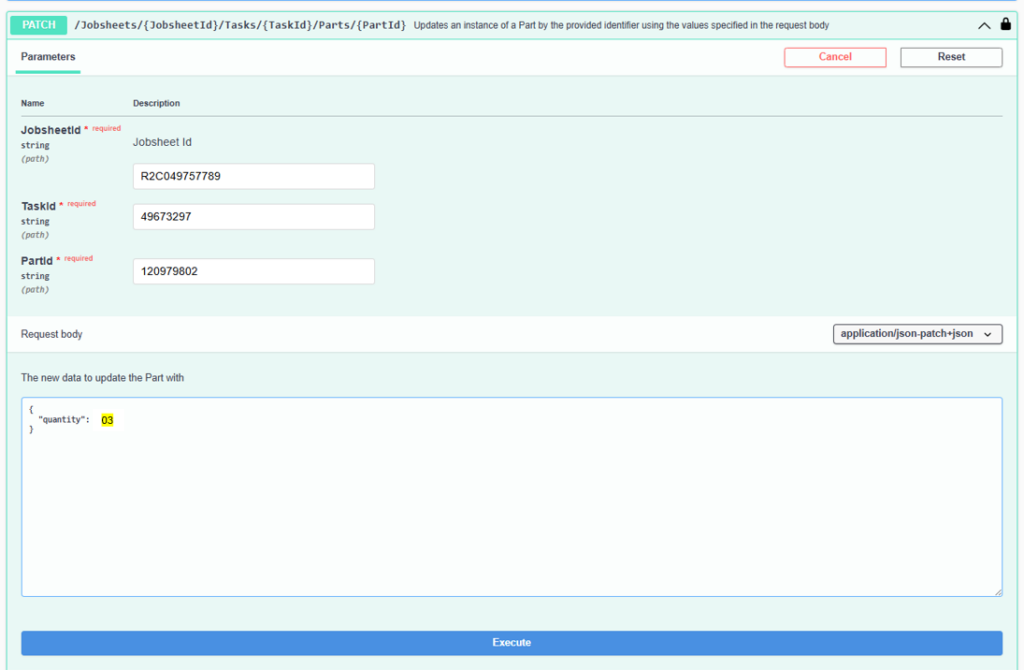
Jobsheet Patch Parts- to update part quantities on existing worklines

Did you find this page useful?

Overall did you find what you were looking for?

Page Rating
Radio Buttons

Account Icon Key

A green outline on the account type icon signifies the guide is applicable whereas a red outline signifies it is not applicable to the the respective account type.

Repair and Maintenance Provider

Operator

Workshop

Is something broken or missing?

Let us know here

Report an Issue Form