Introduction
This guide explains how to use our APIs to perform testing prior to third-party integration and development. It is designed to help developers understand the available endpoints, authentication requirements, request/response structures, and expected behaviours before building a customer-facing interface.
User Configuration – In order to use the API users must be set up with the correct configurations beforehand. These will be arranged by r2c and then shared with the relevant team. Please see below, the requirements needed for each API.
Asset by Depot API
Credentials Required
The credentials required for this API are Account GUID and API Key.
Step by Step
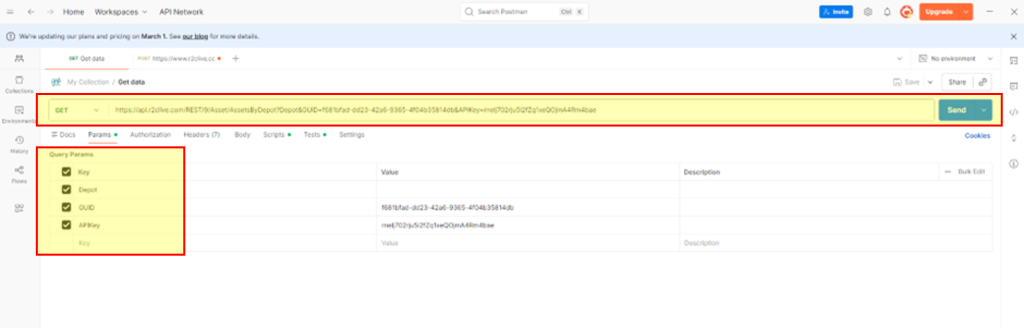
These steps show an example of using the Asset by Depots API to retrieve key details per asset across the fleet list.
The parameteres required are:
- Endpoint URL – https://api.r2clive.com/REST/9/Asset/AssetsByDepot
- Depot (if filtering by specific sites)
- Account Guid
- API Key
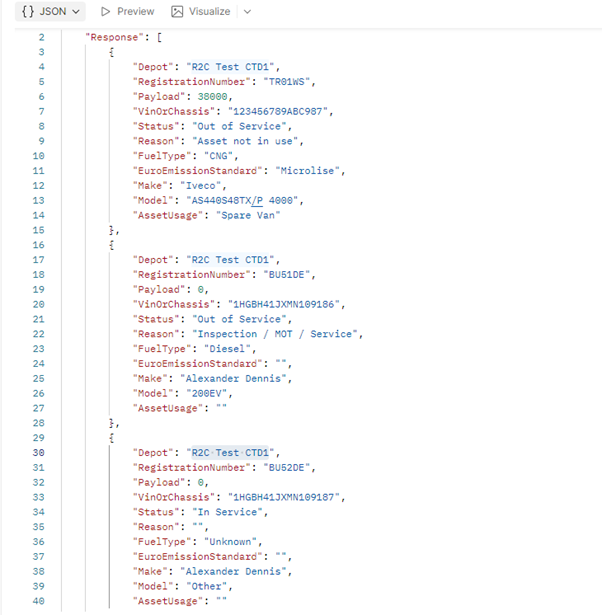
Start by adding the URL and parameters to your third party app. Click ‘send’ to run the API. This example uses Postman. Below are a set of example reuslts retrieved by the API.
Jobsheet API
Step by step
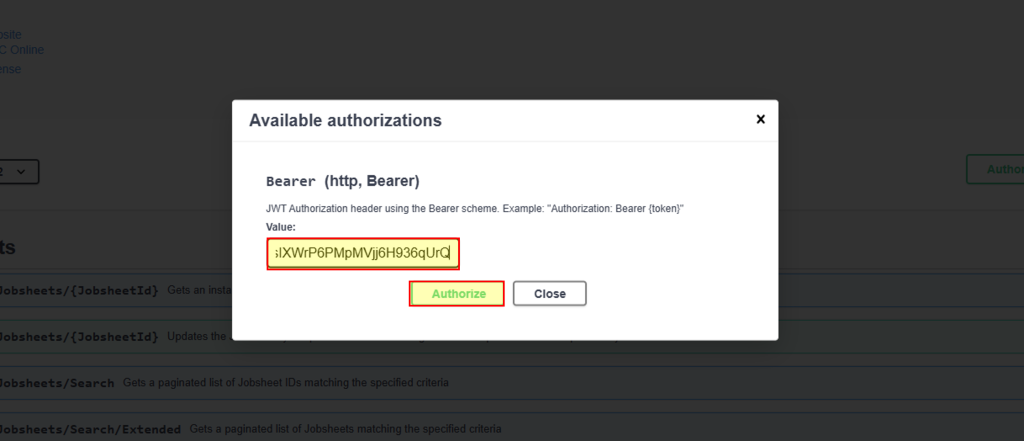
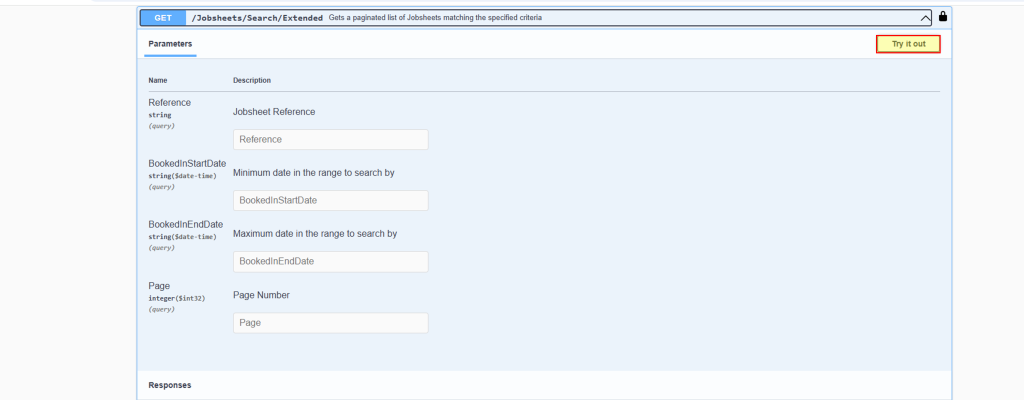
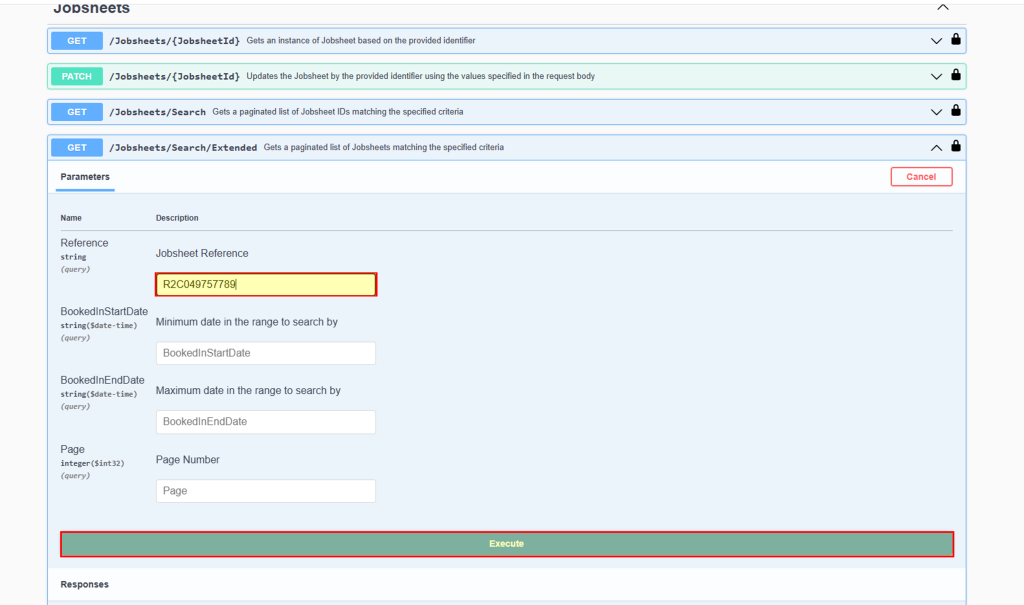
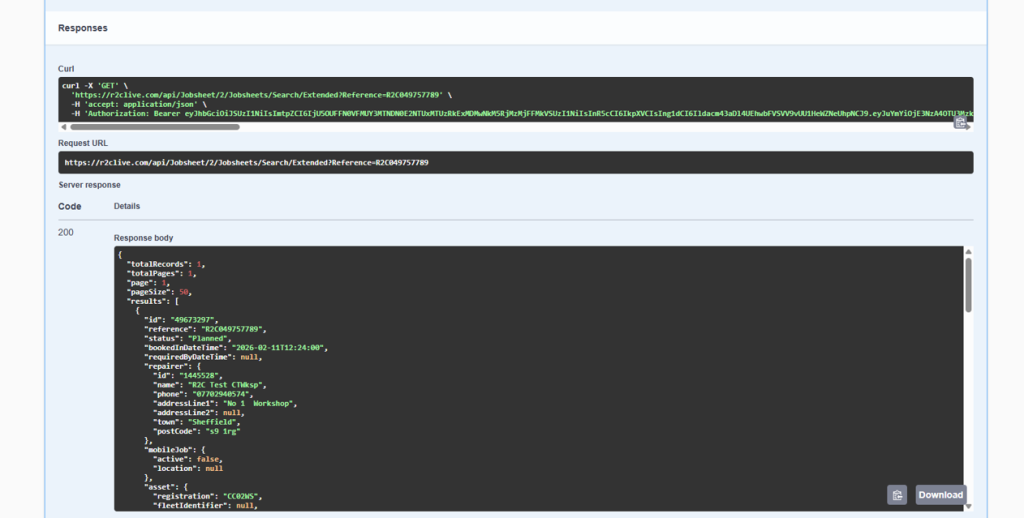
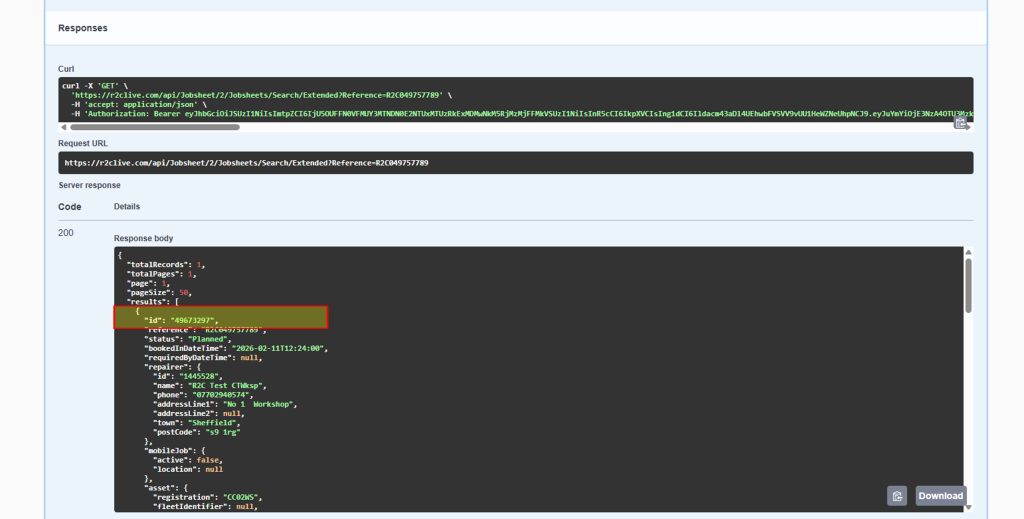
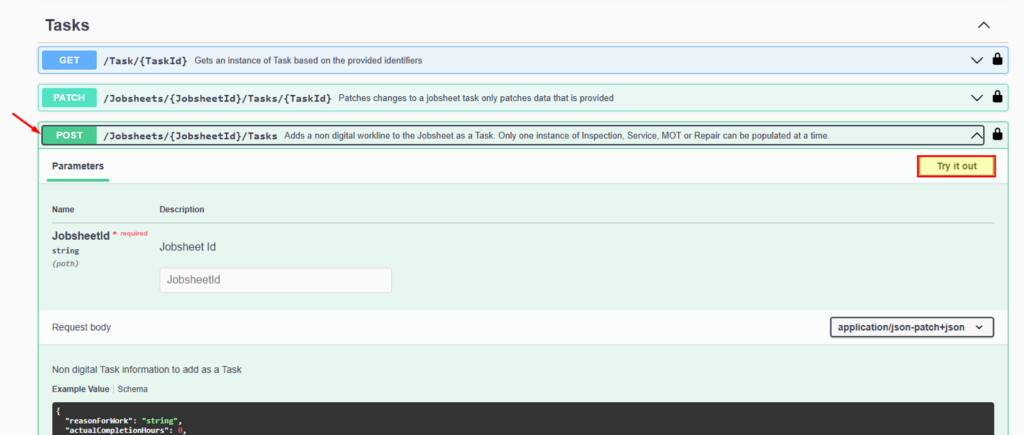
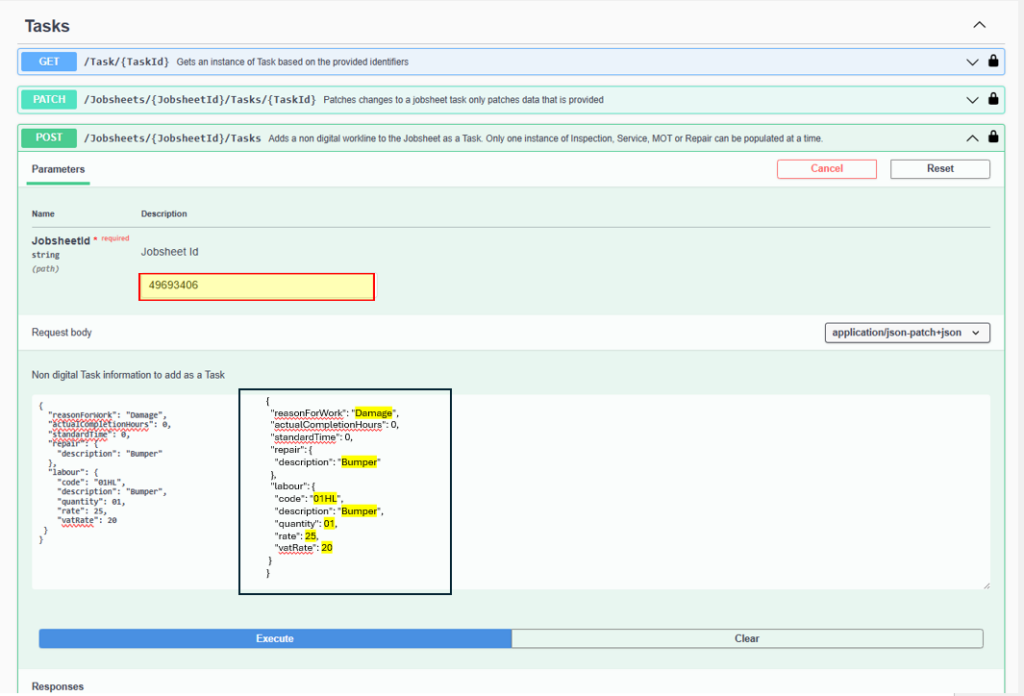
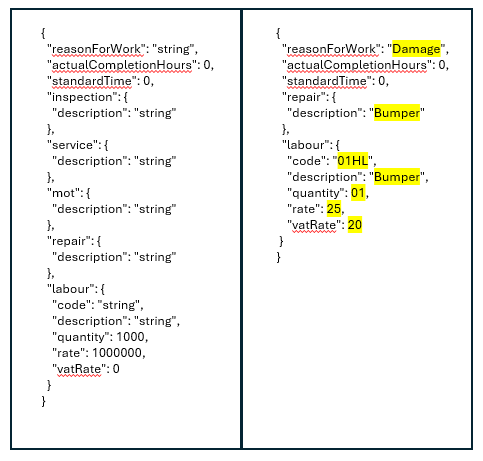
These steps show an example of using the Jobsheet API to retrieve key jobsheet details and update worklines.
The steps required are:
- Credentials
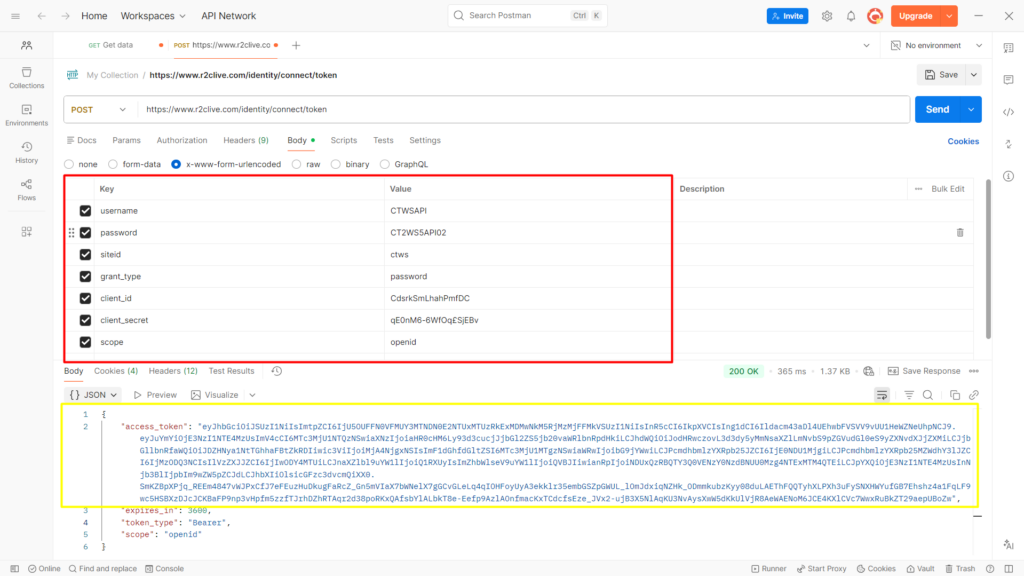
- Token Generation
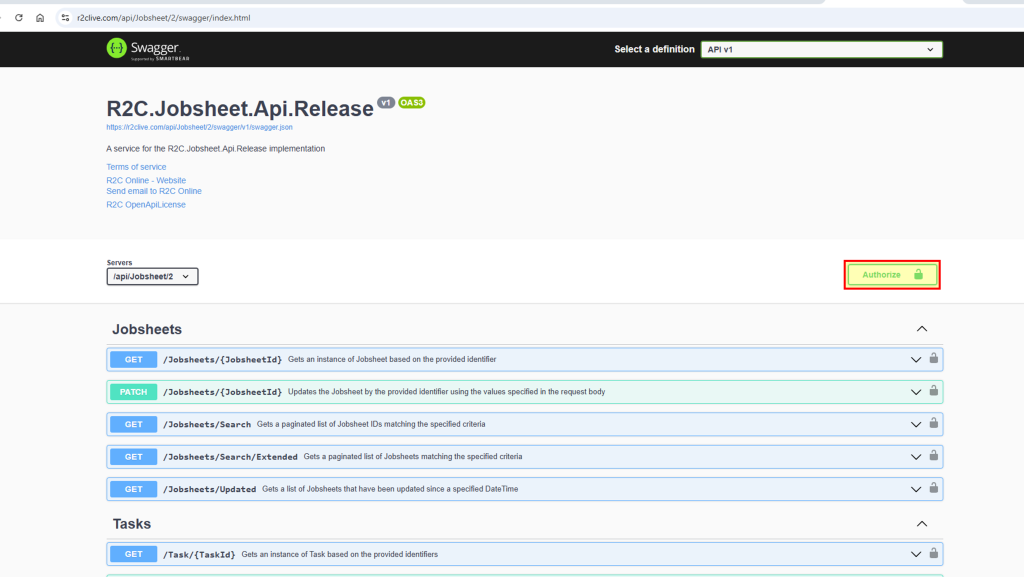
- Authorisation of Token on Swagger docs prior to using an API.
Credentials Required
The credentials required for this API are outlined in the table below. Some of the required details can be found in your r2c portal account, while others are initially configured by r2c and shared with you during the setup process.
| Parameter | Notes | |
|---|---|---|
| Swagger site URL | https://r2clive.com/api/Jobsheet/2/swagger/index.html | Default URL, to access the API |
| End point URL | https://www.r2clive.com/identity/connect/token | Default URL, replace 'www'. With UAT. Depending on Environment. |
| Account | Account name as per portal | - |
| Site ID | Account site ID that is used to login to portal. | - |
| Username | Login credentials for portal | Provided by r2c upon account configuration |
| Password | Login credentials for portal | Provided by r2c upon account configuration |
| grant_type | 'password' | This parameter remains the same for all accounts |
| client_id | Provided by r2c upon account configuration | - |
| client_secret | Provided by r2c upon account configuration | - |
| Scope | Account type identifier. If your account type is a workshop use = openid and if an R&M = r2c_organisation_api | This paramamter changes based on account type. |
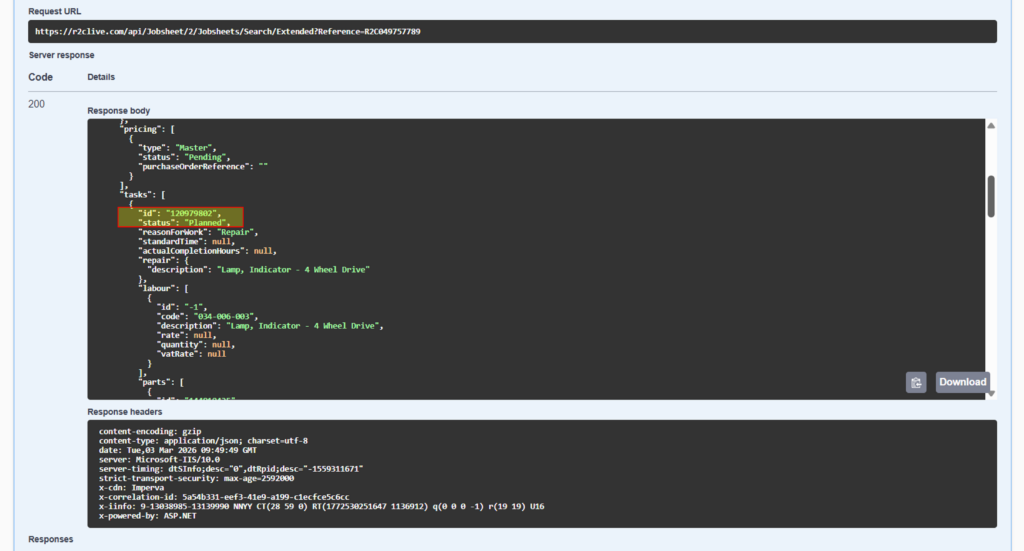
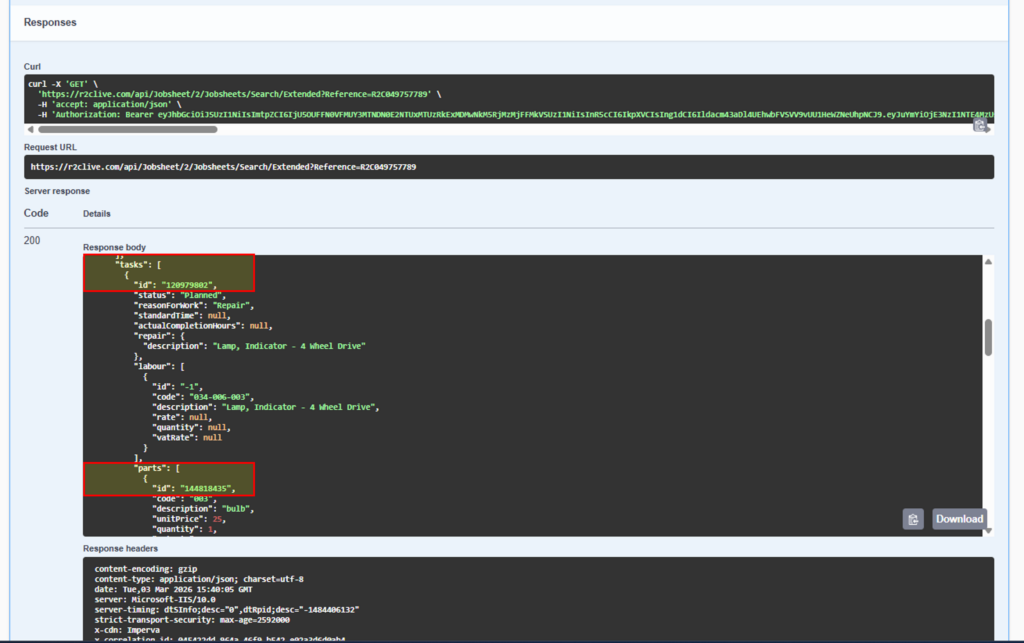
Jobsheet extended API – to retrieve jobsheet details.


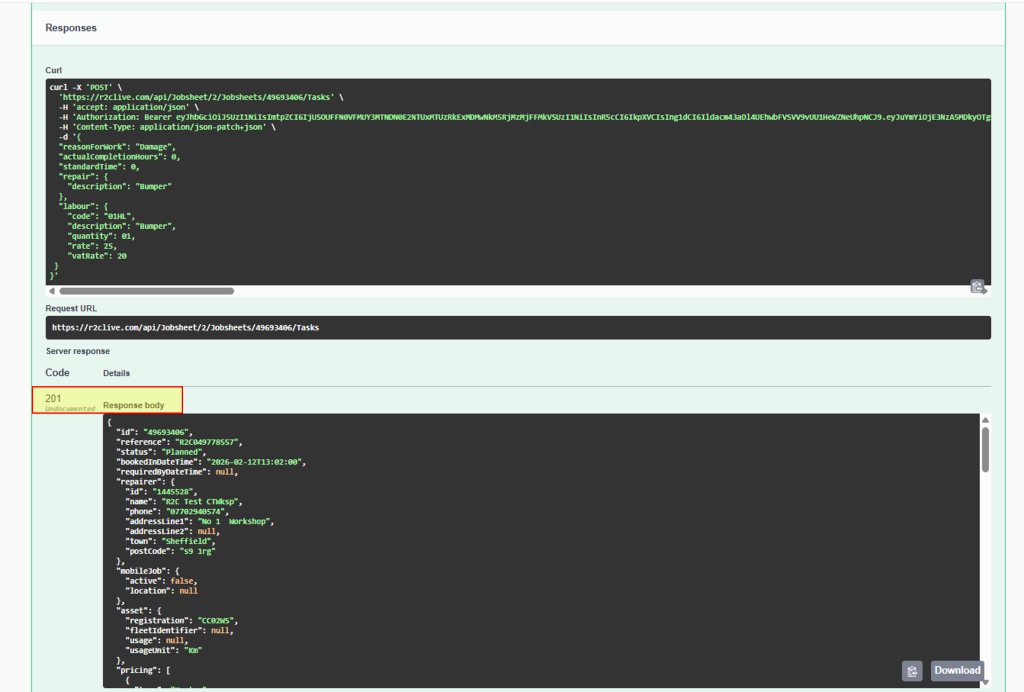
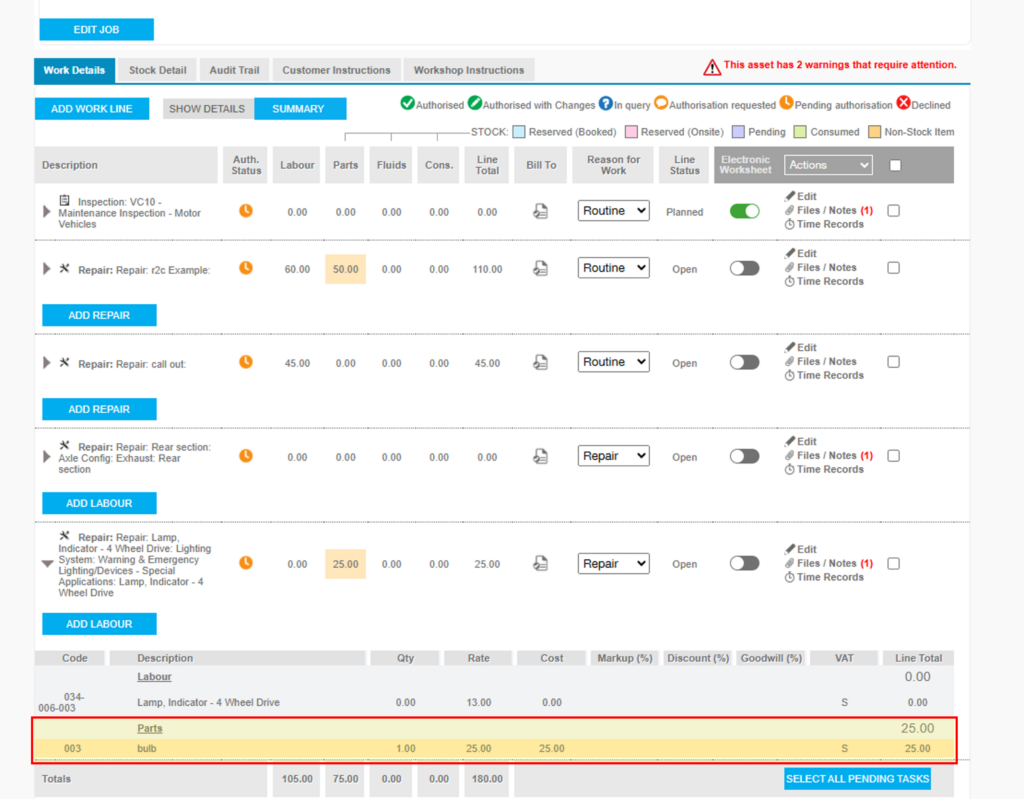
Jobsheet Post Tasks – to add worklines to jobsheets.


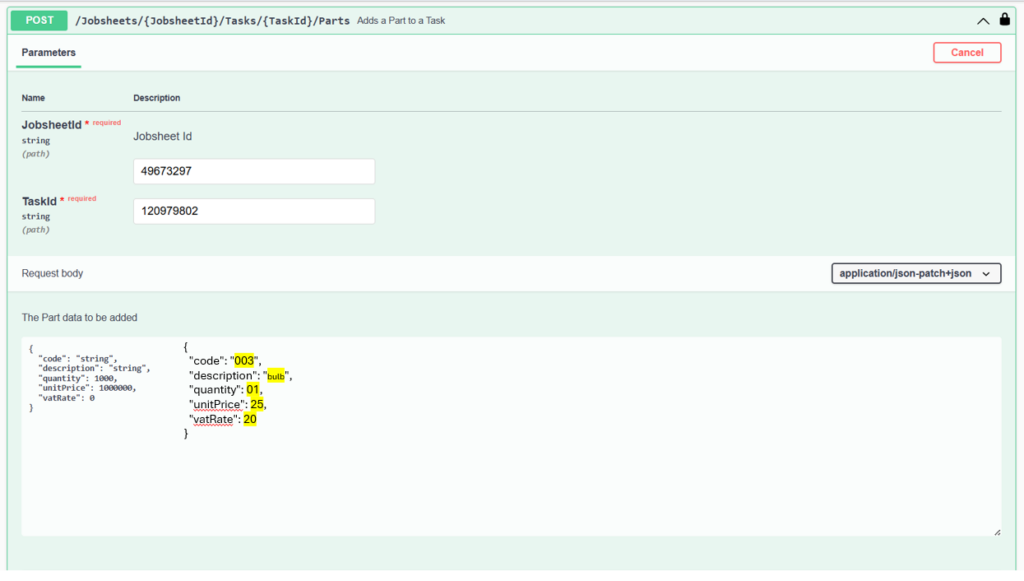
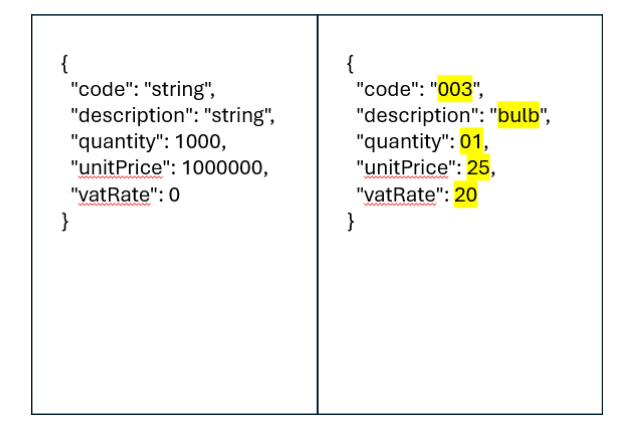
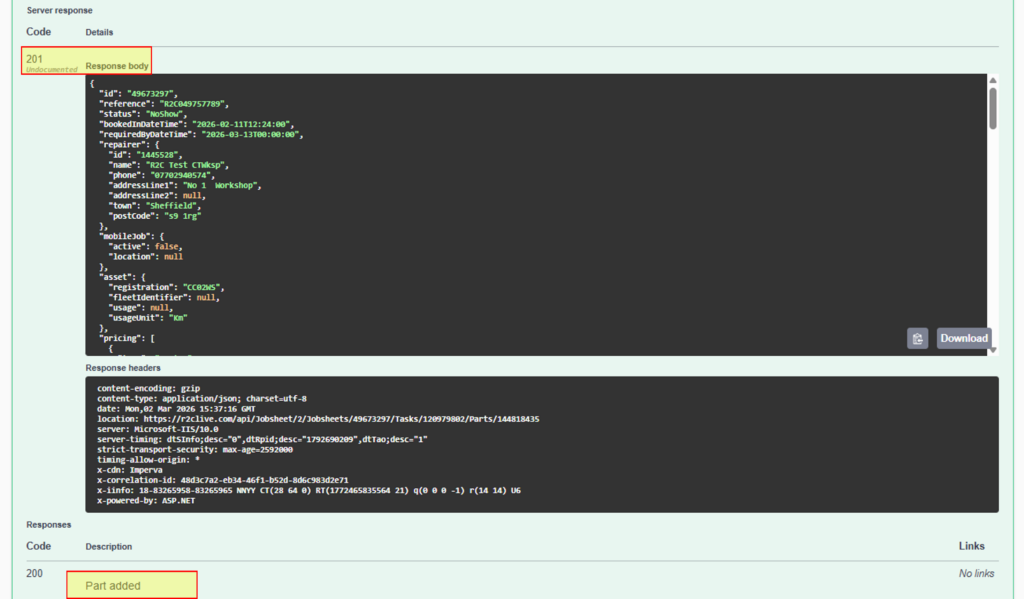
Jobsheet Post Parts- to add parts to existing worklines on jobsheets.


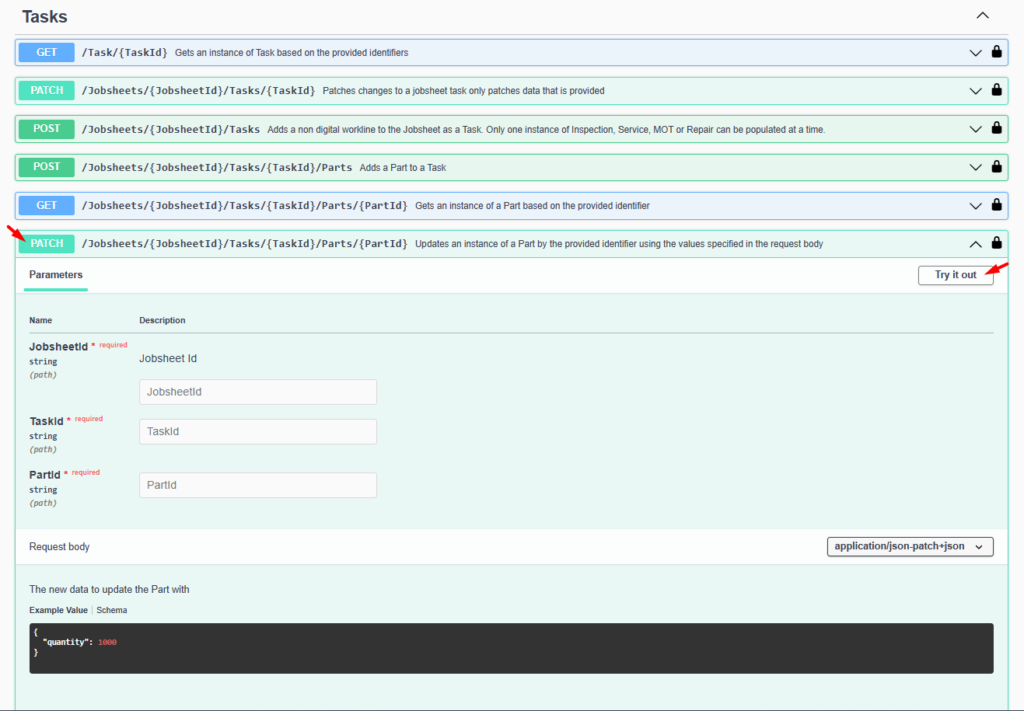
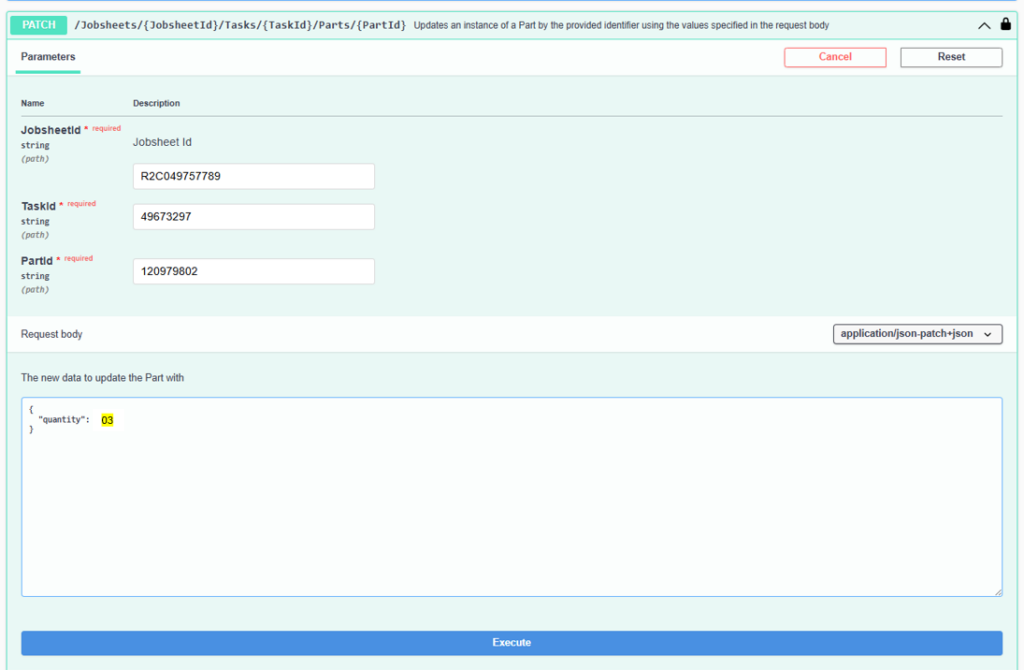
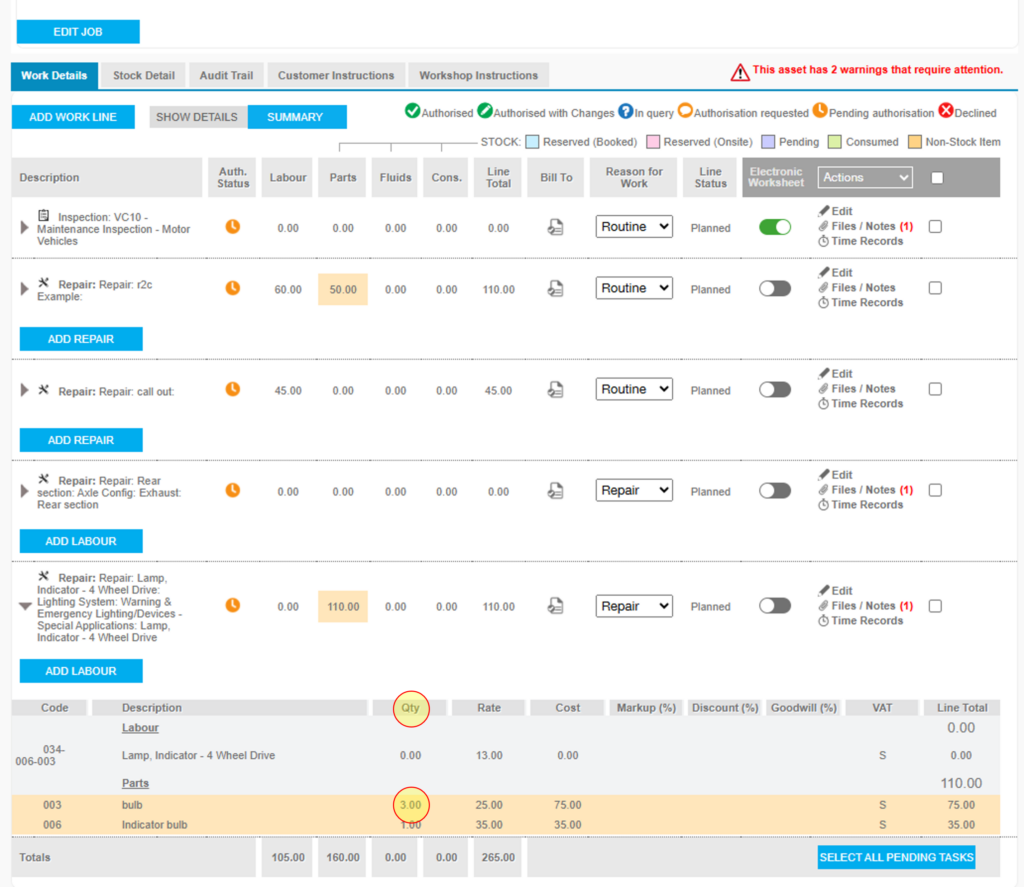
Jobsheet Patch Parts- to update part quantities on existing worklines


Create Asset API
This API allows you to UPDATE existing Assets on r2c by matching an asset and updating specific properties.
1. Parameters
| Name | Description |
|---|---|
| GUID | A unique reference number for the account using the API. |
| APIKey | Password used to connect to the API |
The current URL for versions 9
Live https://uat.r2clive.com/PublicApi/REST/9/Asset/CreateAsset
UAT https://uat.r2clive.com/PublicApi/REST/9/Asset/CreateAsset
2. Body
The main data sent via the API is through the body section. This consists of a R2CPublicAsset structure using the below fields
Match
This is a collection of key/value pairs that are used to match the existing Asset that you want to update.
| Name | Description |
|---|---|
| ExternalReference | The external reference given by the customer when they created the Asset in the API. |
| VinOrChassis | The Vin or Chassis number of the asset. |
| RegistrationNumber | The Registration Number of the asset. |
Updates
A collection of key/value pairs, each specifying a property name and the required value to be updated on the asset record fields in portal.
| Name | Description |
|---|---|
| ExternalReference | A unique reference number for the account using the API. |
| VinOrChassis | The Vin or Chassis number of the asset. |
| FleetNumber | The customer’s fleet number for the asset. Max 20 Characters. |
| RegistrationNumber | The normal identifier for an Asset. Max 10 Characters. |
| Description | ? Free Text, Max 20 Characters. |
| RegDate | Optional Date, YYYY-MM-DD |
| InServiceDate | Optional Date, YYYY-MM-DD |
| ManufactureDate | Optional Date, YYYY-MM-DD |
| Manufacturer | Example: Scania, DAF, Volvo etc. |
| WarrantyExpiryDate | Optional Date, YYYY-MM-DD |
| AssetType | Example: Tractor, Trailer, Rigid etc. |
| BodyType | Example: Artic, Box, Bin Lift etc. |
| InspectionInterval | - |
| UsageUnit | Example: M, Km, H. |
| Workshop | Primary Repairer |
| WorkshopID | ? SITE ID |
| TotalAssetCost | ? String numeric value |
| Usage | Last Known Usage |
| MOTExpiryDate | Optional Date, YYYY-MM-DD |
| TachoExpiryDate | Optional Date, YYYY-MM-DD |
| ParentRegistrationNumber | Optional reg of parent asset. |
| ParentExternalReference | Optional external reference of parent asset |
| GrossVehicleWeight | Decimal gross weight in tonnes |
| Transmission | Example: Automatic, Manual, Semi-Automatic. |
| Colour | Example: Black, Brown Red etc. |
| EmissionStandard | Example: Euro 6, FRD6 etc. |
| ContractLeaseCompany | Free Text |
| ContractLeaseNumber | Free Text |
| ContractLeaseType | Example: 3 Year Rental, 5 Year Finance, Hired etc. |
| ContractStartDate | Optional Date YYYY-MM-DD |
| ContractEndDate | Optional Date YYYY-MM-DD |
| ContractMileage | Optional max mileage |
| ContractExcessMileageCharge | Optional excess mileage |
| ManufacturerRangeModel | The preferred method of setting the manufacturer, range and model. The three are separated by “|” like this: "Manu|Range|Model" |
| Model Number | Free Text, Max 20 Characters. |
| AxleConfig | Axel configuration as Position, Steer & WheelCount. |
| Management Role | Management details as Role & reference.* See available roles below |
| Custom Details | Custom field name and value. *See Custom Details for more information. |
| MaintenanceProduct | Optional section in the Contract Lease tab where you can add 2 optional items. MaintenanceProductName and ExpiryDate. IMPORTANT: if a set of Maintenance Products is included in an Update and the Asset already has some assigned, the new set will replace the entire existing set. |
Management Roles
The API allow a collection of Management Roles to be assigned to the asset.
Note that the role name or code may be used in the “Role” parameter.
| Name | Code |
|---|---|
| Manufacturer | MNFER |
| Owner | OWNER |
| Operator | OPROR |
| Depot | DEPOT |
| Repair Agent | RPRAG |
| Workshop | WRKSH |
| Warranty Provider | WPROV |
| Repair and Maintenance | REMNT |
Maintenance Products
IMPORTANT: if a set of Maintenance Products is included in an Update and the Asset already has some assigned, the new set will replace the entire existing set.
Custom Details
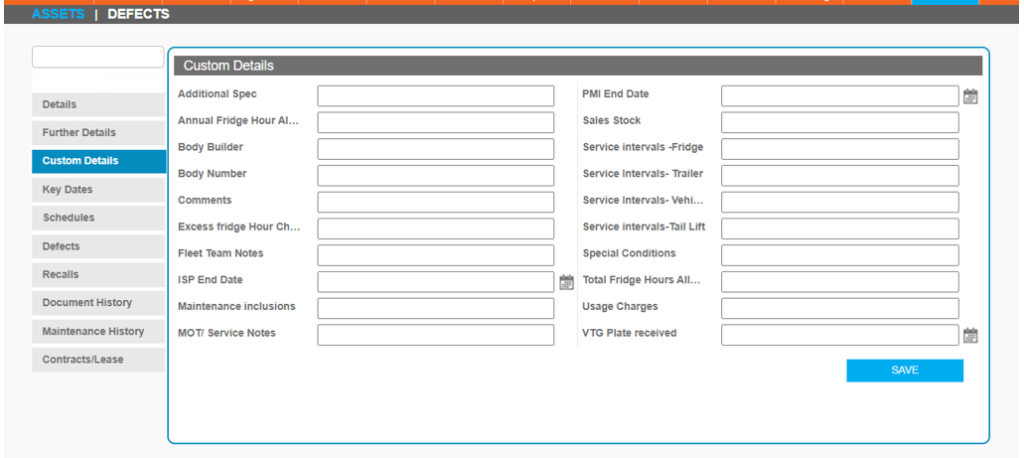
In the R2C platform, customers with the module enabled can create custom values for their assets. These values are only available to that specific customer and appear in a separate tab on the Assets screen.
There is an optional property “CustomUpdates” which can be used to set a collection of key/value pairs that can be sent to the API. The key needs to relate to the name of the custom value, as it appears in the Portal screen above and the value needs to be valid for that Custom Detail, e.g. a number or a date.
3. Responses
Each request receives a response which outlines if the operation was successful as well as any specific success and error messages
Update Asset API
These guides describe the API’s on the R2C Platform, accessible through the Public API’s as a REST API. These API’s do not have Swagger documents, the body information is included below.
1. Parameters
| Name | Description |
|---|---|
| GUID | A unique reference number for the account using the API. |
| APIKey | Password used to connect to the API |
The current URL for versions 9
2. Body
The main data sent via the API is through the body section. This consists of a R2CPublicAsset structure using the below fields
| Name | Description |
|---|---|
| ExternalReference | A unique reference number for the account using the API. |
| RegistrationNumber | The normal identifier for an Asset. Max 10 Characters. |
| VinOrChassis | The Vin or Chassis number of the asset. |
| AssetType | Example: Tractor, Trailer, Rigid etc. |
| Manufacturer | Example: Scania, DAF, Volvo etc. |
| FleetNumber | The customer’s fleet number for the asset. Max 20 Characters. |
| Range | Example: P series, CF, FM etc. |
| Model | Example: P112, 530, 42T |
| Model Number | Free Text, Max 20 Characters. |
| Description | ? Free Text, Max 20 Characters. |
| RegDate | Optional Date, YYYY-MM-DD |
| ManufactureDate | Optional Date, YYYY-MM-DD |
| InServiceDate | Optional Date, YYYY-MM-DD |
| MOTExpiryDate | Optional Date, YYYY-MM-DD |
| TachoExpiryDate | Optional Date, YYYY-MM-DD |
| WarrantyExpiryDate | Optional Date, YYYY-MM-DD |
| Workshop | Primary Repairer |
| WorkshopID | ? SITE ID |
| TotalAssetCost | ? String numeric value |
| UsageUnit | Example: M, Km, H. |
| BodyType | Example: Artic, Box, Bin Lift etc. |
| Usage | Last Known Usage |
| ParentRegistrationNumber | Optional reg of parent asset. |
| ParentExternalReference | Optional external reference of parent asset. |
| GrossVehicleWeight | Decimal gross weight in tonnes |
| Transmission | Example: Automatic, Manual, Semi-Automatic. |
| Colour | Example: Black, Brown Red etc. |
| EmissionStandard | Example: Euro 6, FRD6 etc. |
| ContractLeaseCompany | Free Text |
| ContractLeaseNumber | Free Text |
| ContractLeaseType | Example: 3 Year Rental, 5 Year Finance, Hired etc. |
| ContractStartDate | Optional Date YYYY-MM-DD |
| ContractEndDate | Optional Date YYYY-MM-DD |
| ContractMileage | Optional max mileage |
| ContractExcessMileageCharge | Cost per mile |
| AxleConfig | Axel configuration as Position, Steer & WheelCount. |
| ManagementRoles | Management details as Role & reference.* See available roles below |
| CustomDetails | Custom field name and value. *See Custom Details for more information. |
| MaintenanceProducts | Optional section in the Contract Lease tab where you can add 2 optional items. MaintenanceProductName and ExpiryDate. IMPORTANT: if a set of Maintenance Products is included in an Update and the Asset already has some assigned, the new set will replace the entire existing set. |

Management Roles
The API allow a collection of Management Roles to be assigned to the asset.
Note that the role name or code may be used in the “Role” parameter.
| Name | Code |
|---|---|
| Manufacturer | MNFER |
| Owner | OWNER |
| Operator | OPROR |
| Depot | DEPOT |
| Repair Agent | RPRAG |
| Workshop | WRKSH |
| Warranty Provider | WPROV |
| Repair and Maintenance | REMNT |
Maintenance Products
IMPORTANT: if a set of Maintenance Products is included in an Update and the Asset already has some assigned, the new set will replace the entire existing set.
Custom Details
In the R2C platform, customers with the module enabled can create custom values for their assets. These values are only available to that specific customer and appear in a separate tab on the Assets screen.
There is an optional property “CustomDetails” which can be used to set a collection of key/value pairs that can be sent to the API. The key needs to relate to the name of the custom value, as it appears in the Portal screen above and the value needs to be valid for that Custom Detail, e.g. a number or a date.
3. Responses
Each request receives a response which outlines if the operation was successful as well as any specific success and error messages